
Download Started!
Make sure it's not blocked by your browser
Welcome to YunaMS! Click here to learn more about our features and what we have to offer. Join our discord server to see what everyone's up to. Remember to vote for free daily NX! Enjoy~
Download
Get started in minutes — download, extract, and play
You'll need an account to play!
Register here first, then download the game below. Already have an account? Log in.
 Why is my antivirus flagging the game?
This is extremely common across all private servers and is a false positive. Nexon protected the game client with Themida, a software protection tool that prevents reverse-engineering.
Since the community has worked around this protection to run private servers, most antivirus software now flags these files automatically. The files are safe — just add your game folder as an exclusion.
Platform Guides & Help
Download the game
Click one of the download buttons above to get the game files.
Extract the files
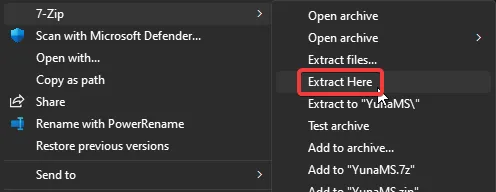
Extract the downloaded archive to a folder of your choice. Right-click the file and select "Extract Here" using 7-Zip or WinRAR.
Add an antivirus exclusion
Add the full game folder path as an exclusion in your antivirus software. This prevents false detections from removing game files.
Launch the game
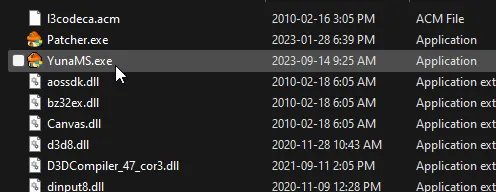
Double-click YunaMS.exe to start playing. You can change your resolution by editing the settings.ini file.
 Discord